Showing posts with label Google. Show all posts

Wednesday, June 2, 2010

Take a test drive into the cloud


Skyhøje priser eller tågedis over landet ... ?
/Sik


Buy a small piece of the Internet ... Go Google ...
/Sik

Quote
We’ve talked about the power of cloud computing and how millions of businesses have alreadygone Google by switching to Apps. But sometimes it’s hard to imagine what working in the cloud would really mean, and frequently, people ask us how they can better understand the benefits of Google Apps specifically for their business. How would online collaboration really affect your workplace? And how could increased email storage or integrated IM and video chat actually impact your company’s productivity?

To answer some of these questions, we’ve created the Go Google cloud calculator to let you take a test drive into the cloud. Whether your company is big or small, brand new or been around for a while, this tool will give you a sense of the benefits of going Google in an easy-to-understand way. Here’s a quick demo:


Once you take a spin and learn about the potential cost and time savings, the tool will create a custom URL, presentation PDF, spreadsheet or even a poster that you can share with other decision makers within your business as you discuss going Google.

To show you a real-life example, we asked one our customers, Smart Furniture (you may remember them from their recent guest post), to test-drive the tool for us. And here’s their poster:
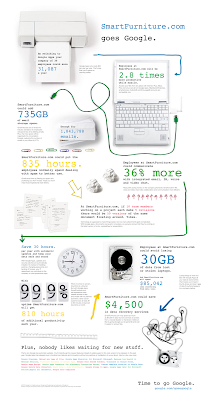

So if you’ve been thinking about moving your business to the cloud, take a couple minutes and see what it would be like to go Google. Be sure to tweet and share your results. The Go Google cloud calculator can be found at www.gonegoogle.com.


Read more: http://googleblog.blogspot.com/2010/06/take-test-drive-into-cloud.html

Saturday, May 15, 2010

WiFi data collection: An update


Nu kan man vælge at tro Google i dette tilfælde ... Men denne 'fejl' kan jo kun sætte blus under spekulationerne ... For nogle år siden var der megen snak om det der Echelon projekt som skulle være i stand til at overvåge AL informationstrafik på kloden ... Om dette er tankespind eller ej kan man kun filosofere over, men det bliver mere og mere klart at tilstedeværelsen af denne Big Brother bliver mindre og mindre usandsynlig ...
/Sik


Even though this 'might' have been a mistake it can only make you wonder ... A while back there was a lot of debate concerning Echelon (the world wide listening project that were suppossedly monitoring ALL information traffic in the world) - if this 'service' exists or not we can only all agree that theoretically this Echelon brother is becoming more and more real as time passes ...
/Sik

Return to Main Page for Echelon Conspiracy Posters

Quote
Nine days ago the data protection authority (DPA) in Hamburg, Germany asked to audit the WiFi data that our Street View cars collect for use in location-based products like Google Maps for mobile, which enables people to find local restaurants or get directions. His request prompted us to re-examine everything we have been collecting, and during our review we discovered that a statement made in a blog post on April 27 was incorrect.

In that blog post, and in a technical note sent to data protection authorities the same day, we said that while Google did collect publicly broadcast SSID information (the WiFi network name) and MAC addresses (the unique number given to a device like a WiFi router) using Street View cars, we did not collect payload data (information sent over the network). But it’s now clear that we have been mistakenly collecting samples of payload data from open (i.e. non-password-protected) WiFi networks, even though we never used that data in any Google products.

However, we will typically have collected only fragments of payload data because: our cars are on the move; someone would need to be using the network as a car passed by; and our in-car WiFi equipment automatically changes channels roughly five times a second. In addition, we did not collect information traveling over secure, password-protected WiFi networks.

So how did this happen? Quite simply, it was a mistake. In 2006 an engineer working on an experimental WiFi project wrote a piece of code that sampled all categories of publicly broadcast WiFi data. A year later, when our mobile team started a project to collect basic WiFi network data like SSID information and MAC addresses using Google’s Street View cars, they included that code in their software—although the project leaders did not want, and had no intention of using, payload data.

As soon as we became aware of this problem, we grounded our Street View cars and segregated the data on our network, which we then disconnected to make it inaccessible. We want to delete this data as soon as possible, and are currently reaching out to regulators in the relevant countries about how to quickly dispose of it.

Maintaining people’s trust is crucial to everything we do, and in this case we fell short. So we will be:
  • Asking a third party to review the software at issue, how it worked and what data it gathered, as well as to confirm that we deleted the data appropriately; and
  • Internally reviewing our procedures to ensure that our controls are sufficiently robust to address these kinds of problems in the future.
In addition, given the concerns raised, we have decided that it’s best to stop our Street View cars collecting WiFi network data entirely.

This incident highlights just how publicly accessible open, non-password-protected WiFi networks are today. Earlier this year, we encrypted Gmail for all our users, and next week we will start offering an encrypted version of Google Search. For other services users can check that pages are encrypted by looking to see whether the URL begins with “https”, rather than just “http”; browsers will generally show a lock icon when the connection is secure. For more information about how to password-protect your network, read this.

The engineering team at Google works hard to earn your trust—and we are acutely aware that we failed badly here. We are profoundly sorry for this error and are determined to learn all the lessons we can from our mistake.


Read more: http://googleblog.blogspot.com/2010/05/wifi-data-collection-update.html

Wednesday, May 12, 2010

Save the Date: Google Geo Teachers Institute, July 21-22


Den kort-kloge generation er på vej ...
/Sik


Our kids will be so much more spatially aware ...
/Sik

Quote
For years, Google's Geo products have been identified as a powerful learning toolkit that can help students conceptualize, visualize, share, and communicate information about the world around them.

This July, Google is hosting the first Google Geo Teachers Institute. This event is a FREE professional development experience designed to help educators get the most from Google's Geo products and technologies. The Geo Teachers Institute is an intensive, two-day event where participants get hands-on experience with Google's Geo products: Google Earth, Google Maps, and SketchUp, including a focus on features like Mars, Moon and Sky in Google Earth. Attendees will learn about innovative instructional strategies and receive resources to share with colleagues. The Google Geo Education team hopes this event will empower educators to bring the world's geographic information to students in a
compelling, fresh, and fun way.

To apply, send email to geoedu@google.com.

Friday, May 7, 2010

Translate the real world with Google Goggles


Kopier den engelske tekst og paste ind her
/Sik


We are still the independent devices moving around in the real world ... Some day some artificial intelligence will be moving around based on the 'services' the big brain (Google) offers ...
And who says that the real world is here on earth ...
/Sik


Quote

Traveling to another country can be an amazing experience. The opportunity to immerse yourself in a different culture can give you a new perspective. However, it can be hard to fully enjoy the experience if you do not understand the local language. For example, ordering food from a menu you can not read can be an adventure. Today we are introducing a new feature of Google Goggles that will prove useful to travelers andmonoglots everywhere: Goggles translation.


Here’s how it works:
  • Point your phone at a word or phrase. Use the region of interest button to draw a box around specific words
  • Press the shutter button
  • If Goggles recognizes the text, it will give you the option to translate
  • Press the translate button to select the source and destination languages.


Google Goggles in action (click images to see large version)


The first Goggles translation prototype was unveiled earlier this year at the Mobile World Congress in Barcelona and could only recognize German text. Today Goggles can read English, French, Italian, German and Spanish and can translate to many more languages. We are hard at work extending our recognition capabilities to other Latin-based languages. Our goal is to eventually read non-Latin languages (such as Chinese, Hindi and Arabic) as well.

Every new release of Google Goggles contains at least one new feature and a large number of improvements to our existing functionality. In addition to translation, Goggles v1.1 features improved barcode recognition, a larger corpus of artwork, recognition of many more products and logos, an improved user interface, and the ability to initiate visual searches using images in your phone’s photo gallery.

Computer vision is a hard problem. While we are excited about Goggles v1.1, we know that there are many images that we cannot yet recognize. The Google Goggles team is working on solving the technical challenges required to make computers see. We hope you are as excited as we are about the possibilities of visual search.

Read more: http://googlemobile.blogspot.com/2010/05/translate-real-world-with-google.html

Monday, May 3, 2010

Google acquires BumpTop: Will Android get a 3D facelift?


Jeg har længe anvendt BumpTop og været rigtig godt tilfreds ... et godt produkt, som nu skal re-inkarneres som et fremtidigt Google produkt ...
/Sik


I've been using BumpTop for a while now ... and it's been great ... Grab a copy while you still can:

For the next week, we're keeping BumpTop Free available for download at bumptop.com/download to give BumpTop fans one last chance to grab a copy.

/Sik


Quote

Google is acquiring BumpTop, a startup that aimed to improve the interface of your computer desktop.

BumpTop launched its first productabout a year ago. The idea, as founder and chief executive Anand Agarawala described it during a talk at the 2007 TED conference, was to do away with the “same old crap” found in the layout of both the Windows and Mac operating systems. By turning the desktop into a three-dimensional space, users can arrange things more naturally and creatively. [...]


More than three years ago, we set out to completely change the way people use their desktops. We're very grateful for all your support over that time — not just financially but also through all the encouraging messages from people who found BumpTop inspiring, useful, and just downright fun.

Today, we have a big announcement to make: we're excited to announce that we've been acquired by Google! This means that BumpTop (for both Windows and Mac) will no longer be available for sale. Additionally, no updates to the products are planned. [...]


Read more:

Monday, April 26, 2010

What’s that barcode in your Google Places account?


Dresser din mobil til at læse disse koder og du kommer hurtigere videre ... Typisk vil et link hurtigt kunne videregives ved et enkelt klik ...
/Sik


Use your mobile phone to access links and other useful information quick and easy ...
/Sik


Quote
If you manage a Google Places account for your business in the U.S., you’ll now find a two-dimensional barcode - known as a QR code - on the right side of your business’ dashboard page. If you have just one business listing, this is the page you’re automatically taken to when you log in. If you have multiple listings, click “View report” to get to this page.


Your QR code is unique to your business, and it allows people with certain mobile Android-powered devices and iPhones to scan it and be taken directly to the mobile version of your Place Page. Once on the mobile Place Page, users can find any discounts that you may be offering, post Buzz about your place, instantly call your business, or get other basic information about your business. Currently, several apps on Android-powered devices and iPhones are fully supported; apps on other devices will take you directly to google.com when you scan the code. Here are some ideas for how you can use your unique QR code as a free marketing tool:
  • Add it to the back of business cards: Lots of you are already giving away business cards to your customers. Adding a QR code lets you add a lot more information, virtually, with your Place Page, and allows you to change information like discounts & real-time updates about your business without changing the card itself.
  • Add it to marketing materials: If you’re running an ad, putting out a pamphlet, or handing out flyers, add a QR code to the corner. We’re using QR codes in a series of new testimonials about Google Places, for example. (Make sure to keep some white space around the QR code to allow for proper scanning).


  • Put it in your window: If you’ve got a poster, a menu, or anything else in your window, a QR code lets customers remember you by scanning the code and saving your business as a personal favorite. We’ve got a sample poster with your unique code already on it, which is ready to print from your dashboard page.
To download your QR code, right click to save the image from the right side of your dashboard page.


Read more: http://google-latlong.blogspot.com/2010/04/whats-that-barcode-in-your-google.html

Tuesday, April 20, 2010

Introducing Google Places


FYI
/Sik


My place or you place ...
/Sik


Quote

Today the Local Business Center is becoming Google Places. Why? Millions of people use Google every day to find places in the real world, and we want to better connect Place Pages — the way that businesses are being found today — with the tool that enables business owners to manage their presence on Google.

We launched Place Pages last September for more than 50 million places around the world to help people make more informed decisions about where to go, from restaurants and hotels to dry cleaners and bike shops, as well as non-business places like museums, schools and parks. Place Pages connect people to information from the best sources across the web, displaying photos, reviews and essential facts, as well as real-time updates and offers from business owners.

Four million businesses have already claimed their Place Page on Google through the Local Business Center, which enables them to verify and supplement their business information to include hours of operation, photos, videos, coupons, product offerings and more. It also lets them communicate with customers and get insights that help them make smart business decisions.

Google Places will continue to offer these same tools, but the new name will simplify the connection with Place Pages. This reflects our ongoing commitment to providing business owners with powerful yet easy-to-use tools.

We're also introducing several new features:
  • Service areas: If you travel to serve customers, you can now show which geographic areas you serve. And if you run a business without a storefront or office location, you can now make your address private.
  • A new, simple way to advertise: For just $25 per month, businesses in select cities can make their listings stand out on Google.com and Google Maps with Tags. As of today, we’re rolling out Tags to three new cities — Austin, Atlanta and Washington, D.C. — in addition to ongoing availability in Houston and San Jose, CA. In the coming weeks we'll also be introducing Tags in Chicago, San Diego, Seattle, Boulder and San Francisco.
  • Business photo shoots: In addition to uploading their own photos, businesses in select cities can now request a free photo shoot of the interior of their business which we'll use to supplement existing photos of businesses on Place Pages. We've been experimenting with this over the past few months, and now have created a site for businesses to learn more and express their interest in participating.
  • Customized QR codes: From the dashboard page of Google Places, businesses in the U.S. can download a QR code that’s unique to their business, directly from their dashboard page. QR codes can be placed on business cards or other marketing materials, and customers can scan them with certain smartphones to be taken directly to the mobile version of the Place Page for that business.
  • Favorite Places: We're doing a second round of our Favorite Places program, and are mailing window decals to 50,000 businesses around the U.S. These decals include a QR code that can be scanned with a smartphone to directly view the mobile Place Page for the business to learn more about their great offerings.
Over the past few months we've also added the ability for business owners to post real-time updates to their Place Page. You might want to promote a sale, a special event or anything else that you want customers to know right now, and this feature lets you communicate that directly to your customers. You can also provide extra incentive by adding coupons, including ones specially formatted for mobile phones.

To keep track of how your business listing is performing on Google, we offer a personalized dashboard within Google Places that includes data about how many times people have found your business on Google, what keywords they used to find it and even what areas people traveled from to visit your business. With the dashboard, you can see how your use of any of these new features affects interest in your business and make more informed decisions about how to be found on Google and interact with your customers.

One out of five searches on Google are related to location, and we want to make sure that businesses are able to be found and put their best foot forward. We’re excited to announce Google Places today, as it’s just the beginning of what’s to come from our efforts to make Google more local. If you want to learn more about Google Places, we’d like to invite you to an upcoming overview webinar, or you can visit our newly updated Help Center. We’ll also be posting on the Lat Long blog throughout the week to give a deeper dive into many of our newest features. To get started now, go to google.com/places.


Read more: http://google-latlong.blogspot.com/2010/04/introducing-google-places.html